iPad Repair Guide: 5th to 10th Generation Base iPad
17 November 2026 · LightspeedTools team
Short answer: The base iPad from the 5th to the 9th generation uses a separate touch glass (digitizer) over the LCD, so a cracked front is usually a glass-only repair and the LCD is replaced only when the image itself is damaged. The 10th generation moved to USB-C and Touch ID in the top button, and as far as we know it still keeps the glass and LCD as separate parts, but its parts do not swap with earlier models. Match parts to the exact generation and Wi-Fi or cellular version before you order.
The base iPad is the workhorse of school, retail and family use, which is exactly why so many of them end up on repair benches. Six generations spread across four body sizes and two connectors look similar from the front but do not share most parts. This hub covers what changed between the 5th and 10th generation, the repairs you will see most, the problem areas technicians commonly report, and which parts fit which job.
Models covered and the key differences
The table below sums up the points that matter on the bench. Confirm the generation with the model number on the back (A-number) or in Settings before you order anything, because the 7th, 8th and 9th generation look almost identical.
| Model | Screen | Connector | Biometrics and buttons | Display build |
|---|---|---|---|---|
| iPad 5th gen (2017) | 9.7 in | Lightning | Touch ID home button | Separate digitizer and LCD; shares many parts with the first iPad Air |
| iPad 6th gen (2018) | 9.7 in | Lightning | Touch ID home button | Separate digitizer and LCD; adds Apple Pencil (1st gen) support, so the digitizer differs from the 5th gen |
| iPad 7th gen (2019) | 10.2 in | Lightning | Touch ID home button, Smart Connector | Separate digitizer and LCD; new 10.2 in body |
| iPad 8th gen (2020) | 10.2 in | Lightning | Touch ID home button, Smart Connector | Separate digitizer and LCD; usually shares the 7th gen glass |
| iPad 9th gen (2021) | 10.2 in | Lightning | Touch ID home button, Smart Connector | Separate digitizer and LCD; the glass is often listed separately from the 7th/8th gen, so check the listing |
| iPad 10th gen (2022) | 10.9 in | USB-C | Touch ID in the top button, no home button, no headphone jack | Redesigned flat-edge body; glass and LCD still sold as separate parts |
Two points trip people up. First, the 9.7 in models (5th and 6th gen) and the 10.2 in models (7th to 9th gen) are not interchangeable even though they look alike. Second, the 10th generation is not a fully laminated display like the iPad Air line, as far as we know; the glass and LCD are separate, but the frame, adhesive, flex routing and connectors are all new. Parts listed for the 10th gen are often also listed as fitting the 2025 model (A16) that followed it; confirm on the listing.
Most common repairs on the base iPad
- Cracked touch glass (digitizer). By far the most common job. On every generation in this guide you can replace the glass on its own if the LCD still shows a clean image.
- LCD damage. Black ink spots, lines, bleeding or no backlight after a hard drop. Replace the LCD, and expect to replace the glass too if it cracked in the same fall.
- Battery. Short runtime, sudden shutdowns or a swollen battery lifting the screen. The 5th to 8th gen share a battery; the 9th and 10th gen use different cells.
- Charging port. No charge, loose cable or intermittent connection. On the Lightning models the port sits on a dock connector flex; on the 10th gen it is a USB-C charging port flex.
- Home button and Touch ID. Stuck or unresponsive home buttons on the 5th to 9th gen; top button and fingerprint flex issues on the 10th gen.
- Headphone jack, speakers, microphone and cameras. Less frequent, but routine once the screen is off.
Digitizer vs LCD: which one to replace
Diagnose before you open the iPad. Power it on and look at the image through the cracks.
- Image clean, glass cracked or touch dead in places: replace the digitizer only. This is the usual result, and it keeps the repair cost down.
- Image damaged (spots, lines, no backlight), glass intact: replace the LCD only. Remove the glass carefully so you can reuse it, or fit new glass if it cracks on removal.
- Both damaged: replace both, and fit the new LCD before the new glass so you can test the image first.
For the full procedure, including heat, adhesive and how laminated iPads differ, see our iPad screen replacement guide for digitizer, LCD and laminated models.
On a 5th gen you would fit the iPad Air/iPad 5 touch screen digitizer, and if the image is damaged, the matching iPad Air/iPad 5 LCD display screen. The 6th gen needs its own iPad 6 touch screen digitizer because of Pencil support. For the 10.2 in models, the iPad 7th/8th touch screen digitizer is a common stock item, and the 10th gen has its own iPad 10th gen touch screen digitizer.
Commonly reported problem areas
These are patterns technicians commonly report across these generations. They are not universal, but they are worth checking for on intake.
- Cracked glass from corner drops. The glass is held by adhesive strips, not a frame, so corner drops often crack the glass while the LCD survives.
- Home button flex torn during glass removal. On the 5th to 9th gen the home button sits on the glass. Cutting too deep at the bottom edge can tear its flex.
- Touch ID lost after a home button swap. The Touch ID sensor is paired to the logic board, so a replacement home button generally works as a button only. Move the original button to the new glass whenever possible.
- Digitizer connector damage on the 7th and 8th gen. Some technicians report torn or damaged digitizer connectors on the board after forced disassembly. Inspect the connector under magnification before blaming the new glass.
- Worn Lightning ports. Older units used daily in classrooms often arrive with worn or debris-packed ports. Clean and inspect before replacing the flex.
- Swollen batteries in older units. A 5th or 6th gen that has been on a charger for years may have a swollen battery pushing the glass up. Treat it as a safety issue first.
Parts by job
| Job | Example parts | Notes |
|---|---|---|
| Glass replacement (5th gen) | iPad Air/iPad 5 digitizer | Fit new adhesive strips that match Wi-Fi or cellular |
| Glass replacement (6th gen) | iPad 6 digitizer | Not interchangeable with the 5th gen glass |
| Glass replacement (7th to 10th gen) | 7th/8th digitizer, 10th gen digitizer | The 9th gen glass is listed separately; check before ordering |
| LCD replacement | iPad Air/iPad 5 LCD | Test the LCD before closing the iPad |
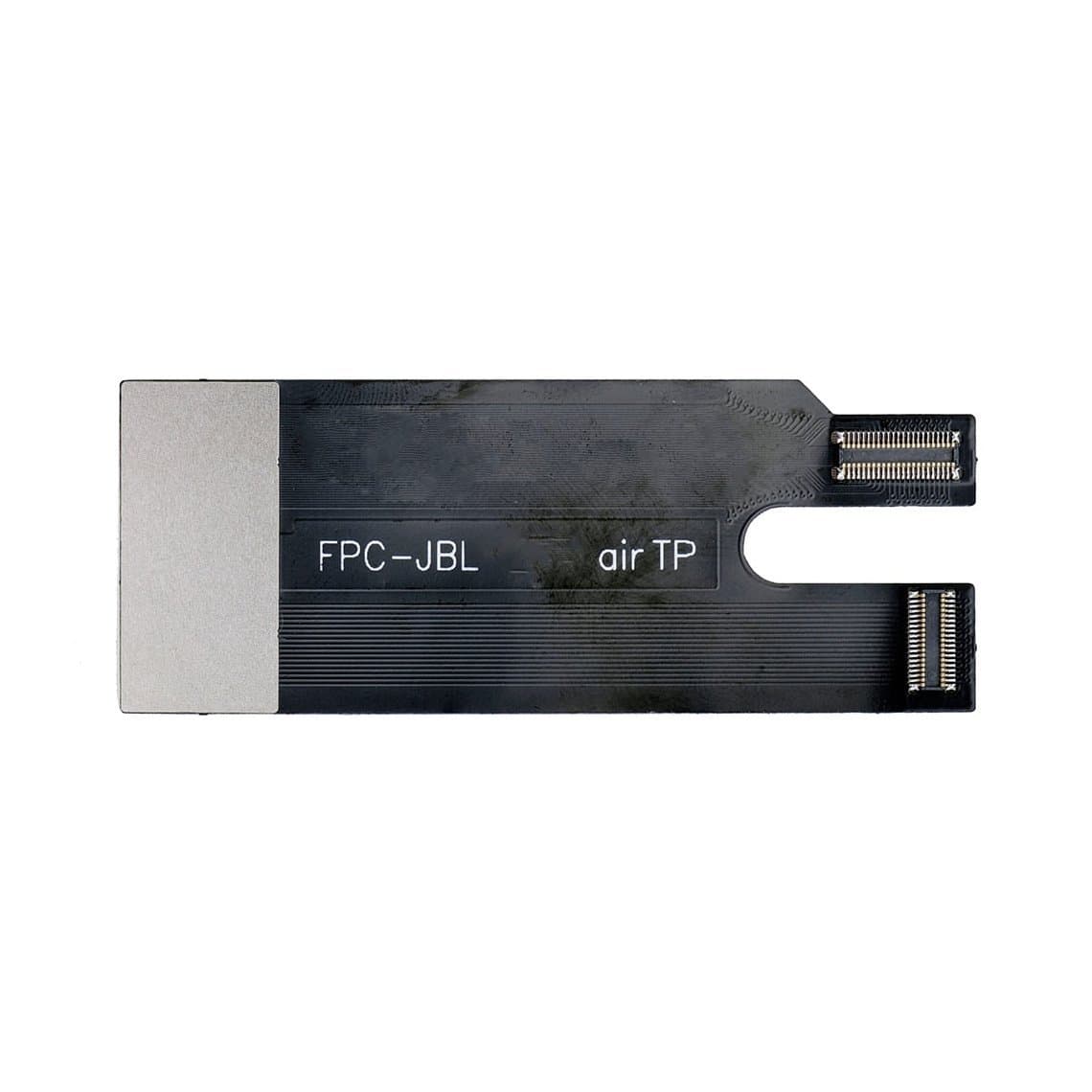
| Testing an LCD before fitting | iPad Air/iPad 5 LCD testing cable | Saves a second opening if the LCD is faulty |
| Battery (5th to 8th gen) | iPad 5/6/7/8 battery 8827mAh | The 9th and 10th gen use different cells |
| Home button (5th and 6th gen) | iPad 5/6 home button assembly | Works as a button; Touch ID needs the original sensor |
| Charging port (6th gen) | iPad 6 dock connector flex | Clean and inspect the port before replacing |
For battery work in detail, read our iPad battery replacement guide on adhesive and safety. If an iPad will not charge after a port swap, our guide to iPad charging faults across port, battery and board walks through the diagnosis.
Step-by-step overview for a glass replacement
- Back up if possible, power off and note whether the unit is Wi-Fi or cellular.
- Heat the edges evenly and use thin picks to cut the adhesive. Keep picks shallow at the bottom edge (home button flex) and near the antenna areas on cellular models.
- Remove the broken glass in sections while wearing eye protection, then clean all old adhesive from the frame.
- Free the LCD, disconnect the battery first, then disconnect the display and digitizer flexes.
- Transfer the original home button to the new glass on the 5th to 9th gen to keep Touch ID.
- Connect the new glass and test touch across the whole surface, including the edges, before applying adhesive.
- Apply fresh adhesive strips for the correct version, seat the glass and clamp gently while the adhesive sets.
Safety
- ESD: work on a grounded mat and wear a wrist strap. iPad flex connectors are fine and easy to damage.
- Glass: broken iPad glass shatters into sharp shards. Wear eye protection and clean the bench well afterwards.
- Heat: warm the edges evenly and moderately. Too much heat can damage the LCD and the battery underneath.
- Lithium batteries: disconnect the battery before touching any other connector. Never pry against a battery or puncture it. A swollen battery should be removed with care and stored in a fire-safe container until it is recycled.
Software support and whether a repair makes sense
Before quoting a costly repair on an older unit, check Apple's current iPadOS compatibility list. The 5th and 6th gen stopped receiving major iPadOS updates some years ago, and the 7th gen has since been dropped from newer major releases too. Older units still work for many uses, but some apps may stop supporting them. A glass repair often makes sense on any of these models; a glass plus LCD plus battery job on a 5th gen is worth discussing with the customer first.
Questions
Can I replace only the glass on an iPad 9th generation?
Yes. The 9th gen, like the 5th to 8th gen, uses a separate digitizer above the LCD. If the image is clean, replace only the glass and transfer the original home button to keep Touch ID.
Is the iPad 7th gen screen the same as the iPad 8th and 9th gen?
The 7th, 8th and 9th gen share the 10.2 in size and the LCD is commonly listed as fitting all three. The glass is usually shared by the 7th and 8th gen, while the 9th gen glass is often listed separately. Always check the listing against the model number.
Will Touch ID work after replacing the home button?
Generally not. Touch ID is paired to the logic board, so a replacement home button usually works as a button only. Moving the original button to the new glass keeps Touch ID working.
Does the iPad 10th gen have a laminated screen?
As far as we know, no. The 10th gen keeps a separate glass and LCD, unlike the iPad Air models, but its parts are new and do not fit earlier base iPads. Some parts are also listed for the 2025 model, so check the listing.
Find digitizers, LCDs, batteries and flex cables for every generation in the iPad parts section. Shops buying in volume can open a wholesale account, and repeat orders go fastest through Quick Order by SKU or CSV.