iPhone No Service After Screen Replacement: Causes and Fixes
17 November 2026 · LightspeedTools team
Short answer: When an iPhone shows "No Service" right after a screen replacement, the cause is usually mechanical: an antenna flex or coaxial connector knocked loose, a damaged antenna flex, or a shield, screw or grounding contact that was not refitted correctly. Rule out the SIM and software first with a restart, airplane mode toggle and network settings reset, then open the phone and inspect every antenna connection under a microscope before you suspect the board.
A customer who comes back with no signal will assume the repair caused it. Sometimes it did, sometimes it was a fault waiting to happen, and sometimes it is only the carrier. Use a fixed order of checks to find the real cause without swapping parts at random.
Why a screen replacement can cause No Service
The display connectors sit on the logic board, usually under a metal bracket, and on most iPhones the antenna connections are close by. Opening the phone, lifting the battery connector, removing the display bracket and pressing new connectors home all put force near parts that were never designed to be handled. These are the common mechanical causes.
Unseated antenna flex or coaxial connector
Antenna paths in iPhones run through small press-fit coaxial connectors and flex cables that land on spring contacts or screw-down pads. A spudger slipping off the display connector, or a finger resting on the board edge while the screen is opened like a book, can lift one of these just enough to break contact. The connector may look seated from above while sitting slightly tilted. This is the most common cause and the cheapest fix: reseat it and the signal returns.
Damaged antenna flex
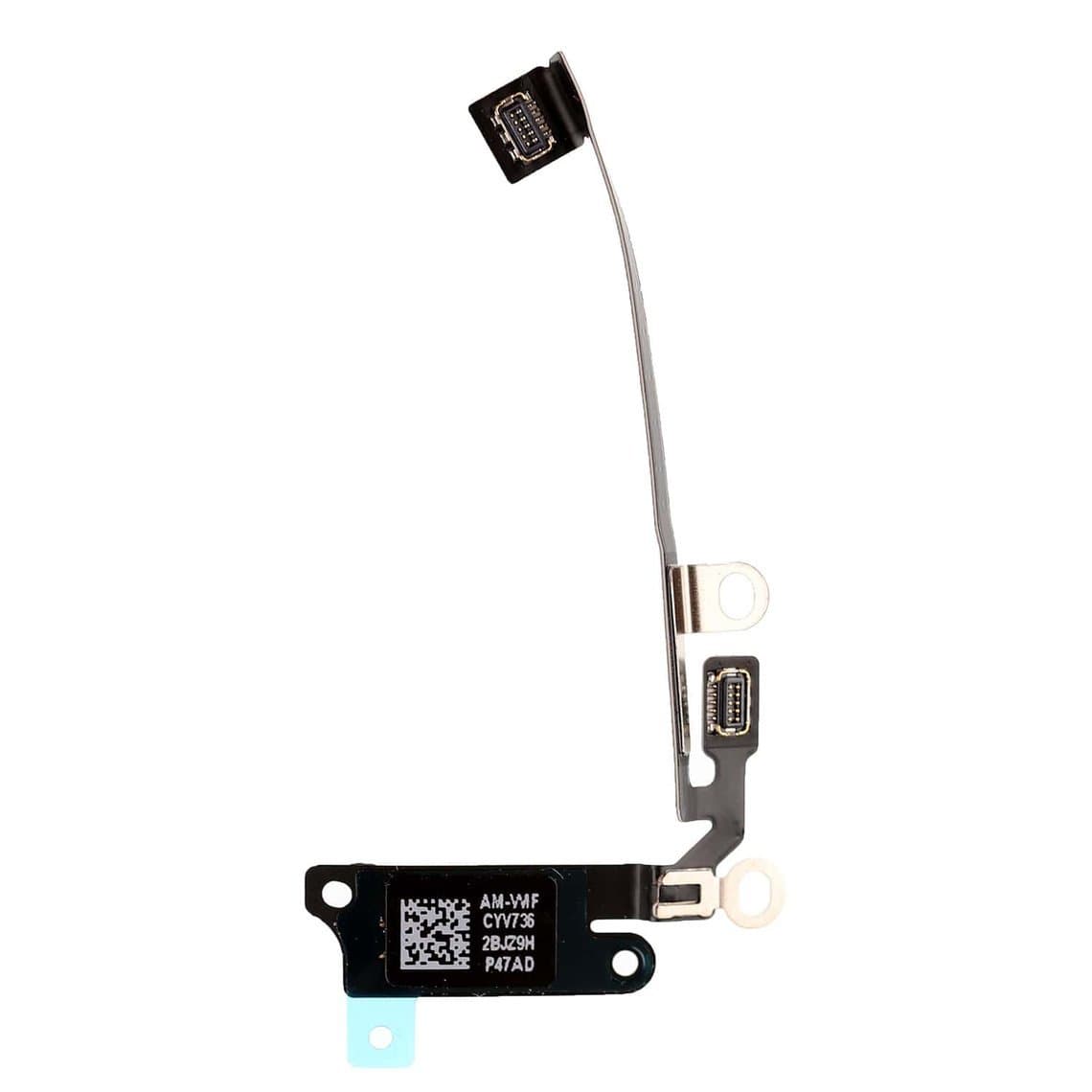
Some models route an antenna flex along the bottom of the phone next to the loudspeaker. Parts suppliers list these as loudspeaker antenna flexes, for example the iPhone X loudspeaker antenna flex or the iPhone XR loudspeaker antenna flex cable. These flexes are thin and can crease or tear when the bottom of the screen is lifted too far, when adhesive is cut with a blade, or when the loudspeaker is pulled out to reach screws. A torn trace or a cracked contact pad often looks like a faint line or a lifted gold contact under magnification.
Screws, shields and grounding contacts
Antennas depend on good grounding to the frame. Display brackets, shields and their screws are part of that path on many models. A missing screw, a screw left loose, a bracket fitted upside down or a bent grounding spring can weaken reception, and in some cases cause a total loss of service. The opposite problem is just as serious: on several older models a longer screw driven into the wrong hole of the display shield can damage traces in the board beneath it. Keep screws in a magnetic mat laid out in the same pattern you removed them, and never force a screw that stops early.
SIM tray and SIM reader
If the phone was dropped, the SIM tray may have been knocked out of shape, or the customer may have removed the tray during the visit. A bent tray, a SIM card that shifted, or debris on the reader contacts produces "No SIM" or "Invalid SIM" first, but some customers describe any missing signal as "No Service". Always check what the status bar actually says.
Liquid and the original damage
Liquid that entered through cracked glass can corrode antenna contacts and only show up days later. If you see residue or green corrosion around connectors, treat it as a liquid case, not damage from your repair.
Step 1: rule out the SIM, carrier and software
Before reopening the phone, spend five minutes on the simple checks. They solve more cases than you would expect.
- Read the status bar. "No Service", "Searching", "No SIM" and "SOS only" point to different causes. SOS only means the phone can see a network but not register on its own carrier, which is usually a SIM or account issue rather than hardware.
- Restart the phone. A full restart clears many registration glitches after the battery has been disconnected.
- Toggle airplane mode on for 15 seconds and off again.
- Reinsert the SIM, check the tray sits flush, and if possible try a known-good SIM from the same carrier. For eSIM phones, check that the eSIM line is still turned on under Settings, Cellular.
- Check for a carrier settings update under Settings, General, About. If one is offered, install it.
- Reset network settings under Settings, General, Transfer or Reset iPhone, Reset. Tell the customer this clears saved Wi-Fi passwords.
- Ask the carrier. An account suspension, unpaid bill or a blocked device shows exactly the same symptom.
One more quick check: open Settings, General, About and look for the IMEI and Modem Firmware lines. If both are present, the modem is talking to the system and the fault is more likely antenna, SIM or carrier related. If either is blank, the fault is almost certainly on the board (see Step 5).
Step 2: compare signal and find the pattern
Put the phone next to another phone on the same carrier. Note whether it has no bars, weak bars, or signal that drops when the frame is squeezed, and test Wi-Fi and Bluetooth too. The pattern tells you where to look:
| Symptom | Most likely cause | First action |
|---|---|---|
| No Service, IMEI and Modem Firmware shown | Antenna connector unseated or antenna flex damaged | Reopen, reseat and inspect all antenna connections |
| Weak signal that changes when the frame is pressed | Loose screw, missing shield or poor grounding contact | Check every screw position and grounding spring |
| No SIM or Invalid SIM | SIM tray, SIM card or SIM reader | Test with another SIM, inspect the reader pins |
| Wi-Fi or Bluetooth weak, cellular fine | Wi-Fi or Bluetooth antenna flex | Inspect that flex and its contacts |
| IMEI or Modem Firmware blank | Baseband or other board-level fault | Stop parts swapping, refer to board repair |
| Corrosion visible near connectors | Liquid damage | Clean, document, quote as a liquid case |
Step 3: reopen and inspect under magnification
Work on an ESD mat with a grounded wrist strap. Disconnect the battery first, as you did for the screen job. Then go through the antenna path methodically rather than only looking at the connector you suspect.
- Coaxial connectors: press each one down gently with a flat spudger until you feel a soft click. A connector that will not stay seated may have a damaged socket.
- Antenna flex contacts: look for bent spring contacts, lifted pads, scratches through the gold plating, or contact points pushed out of line.
- The flex itself: follow it along its full length. Creases, tears and lifted traces often sit where the flex bends around the loudspeaker or the frame.
- Screws and shields: confirm each screw is in the right hole and fully tight, and that brackets and shields are fitted in the right orientation.
- SIM reader: check for bent or missing pins.
Naked-eye inspection misses most of this. A stereo microscope at 7x to 20x makes a lifted coax connector or a hairline crack in a flex obvious. If you are choosing one, our microscope buying guide for mobile repair covers what matters, and you can compare models in our microscopes category.
Step 4: replace the antenna flex if it is damaged
If the flex is creased, torn or has a damaged contact, replace it. Do not try to bend a torn flex back into place; it may work on the bench and fail a week later. Antenna flexes are model-specific, so match the part to the exact model, and on models with several antenna flexes make sure you have the right one. Examples include the iPhone 8 loudspeaker antenna flex cable, the iPhone XS loudspeaker antenna flex cable and the iPhone XS Max loudspeaker antenna flex cable.
The same inspection applies to Wi-Fi and Bluetooth complaints. If the customer reports weak Wi-Fi after the repair while cellular is fine, look at parts such as the iPhone 11 Wi-Fi antenna flex cable or the iPhone XR Bluetooth antenna flex cable. On iPhone 12 and later US models with mmWave 5G, a separate 5G antenna module and flex is involved, for example the iPhone 12/12 Pro 5G module antenna flex cable; a fault there may only affect 5G while LTE still works.
Step 5: know when it is a board-level fault
If the IMEI or Modem Firmware is missing, or every antenna connection is good and the phone still has no service with a known-good SIM, the problem is likely on the logic board. Causes can include a cracked joint under the baseband or RF chips, often after a drop, damaged components near the antenna connectors, or corrosion under shields. Some models have a known history of baseband trouble after impacts, but this varies by model and is not something to diagnose by guesswork.
Board-level radio repair needs a microscope, a good soldering station and hot air, and often reballing of BGA chips. If you do this work, a quality soldering station is the base of the bench. If you do not, refer the phone to a board specialist and say so clearly to the customer. Replacing antenna flexes one after another on a phone with a blank IMEI only wastes parts and time.
How to prevent No Service complaints
- Test before you open. Check signal, Wi-Fi, Bluetooth and the IMEI line before the repair and note the result on the job ticket. A phone that already had no service is not your fault, and your notes prove it.
- Disconnect the battery first, keep tools away from the board edge, and never open the display wider than its flex allows.
- Refit every screw, bracket, shield and insulator in its original position, such as the display flex insulator sticker on the XS Max.
- Test again after assembly, including a call and a data check, before the phone leaves the bench.
If the new screen itself shows problems such as no touch or no image, that is a separate issue covered in our guide to an iPhone screen not working after replacement. Fitting the right screen grade also reduces comebacks; you can browse graded displays in our iPhone screens category.
Questions
Can a screen replacement really cause No Service on an iPhone?
Yes. The screen itself does not carry the cellular antenna, but the work happens next to antenna connectors, flexes, screws and shields. Knocking a connector loose, creasing an antenna flex or leaving out a screw or grounding contact can all cause No Service or weak signal.
Why does my iPhone say No Service but the SIM works in another phone?
If the SIM works elsewhere, the cause is in the phone or its carrier settings. Restart, toggle airplane mode, update carrier settings and reset network settings first. If that fails and the IMEI is still shown in Settings, an antenna connection or antenna flex is the most likely cause.
What does a missing IMEI after a repair mean?
A blank IMEI or Modem Firmware line usually means the system cannot talk to the modem, which points to a board-level fault such as the baseband rather than an antenna. Antenna parts will not fix it. The phone should go to a technician who does board-level repair.
Will a non-original screen affect the iPhone's signal?
A properly fitted screen should not affect cellular signal, because the display does not carry the cellular antennas. Signal loss after a screen job almost always comes from disturbed antenna connections, damaged flexes or missing screws and shields, not from the screen grade.
For the parts mentioned here, browse antenna flexes and other replacement parts in our iPhone parts section, and the tools for inspection in our microscopes category. Repair shops can unlock wholesale pricing through our wholesale program, and reorder known SKUs in bulk with Quick Order.